
Office Assistant Package
3.36
November 7, 2008
The Office Assistant package contains two components with the purpose of adding animated characters and balloon shape dialogs similar to the Microsoft® Office applications to programs written in Delphi.
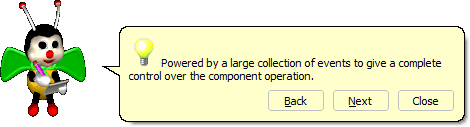
The TAssistant component one of the components in the Office Assistant package. This component is non-visual and provides a stage (either floating or fixed) for the loaded animated character (actor) into the component. In addition, this component has some properties and methods for showing standard dialogs (balloon shape) like message boxes, hints, tips, and search dialogs.
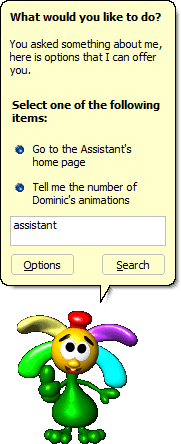
The main features of the TAssistant component are:
- Ability to replace the active actor dynamically.
- Has integrated balloon tips for showing tip of the day or any other tips.
- Powered by a guide (search) balloon to accept the users search requests and show the topics of the search result.
- Has integrated balloon shape message box with customizable icon.
- Has both round and rectangular cloud balloons.
- Can manipulate custom balloons.
- Uses separated threads for handling the actor’s states.
- Can be moved (dragged) even when a modal balloon/dialog is showing.
- A specific queued or playing animation can be stopped within the program.
- Has three level of predefined idling animations.
- Plays idle animations automatically. Idle times can also be controlled manually.
- Supports Middle Eastern languages and can be customized easily for use in multi-lingual applications.
- Powered by a large collection of events to give complete control over the component operation.
- The relative speed of animations can be controlled within the component.
- Can play actor’s animations in a 256-color screen mode without loosing color quality.
- Supports both Microsoft® Office 97 and 2000 balloons look.
The TOffice97Button component is the other component in the Office Assistant package. This component is a fully customizable button control that looks like the Microsoft® Office (both 97 and 2000) button controls (button, radio buttons, up buttons, and down buttons). Thanks to Jonathan Hosking for writing such a nice component.
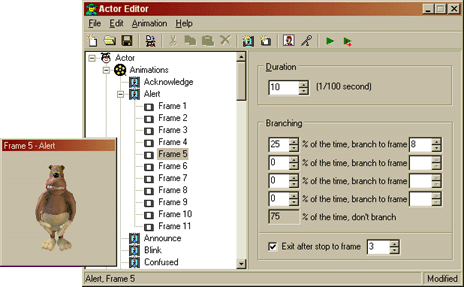
To have an assistant for your application, you need to have at least one Actor Library. Each actor library contains actions and animations of an assistant’s character. Of course, you can create your own actor libraries by using Actor Editor provided in the download section of this page.
Because actor libraries are DLL resources, you can use an exe-compressor to compress them. ASPack is one of the exe-compressors that has been tested for compressing actor libraries and works great. Thanks to Bill Miller for this information. You can contact Bill for more information about compressing actor libraries.
The TAssistant component contains some text that is used in predefined balloons of the component. If you are going to use the TAssistant component in an application with non-English user interface, you may need to edit the file oaConst.pas to change text captions. String constants in oaConst.pas are not read-only and can be changed even at run-time. At the download section of this page you can find some translations for oaConst.pas in different languages.
Finally, I have to mention that using Microsoft® Agent characters provided by Microsoft as actor library are against copyright law.
Downloads
Office Assistant Package (135.3 KiB, Last updated on November 7, 2008)Source code of the Office Assistant package, including the documentation and a demonstration program.
Office Assistant Demo (292.2 KiB, Last updated on September 13, 2005)Executable demo of the Office Asssistant package, compiled in Delphi 7. To see the demo, you should have at least one actor library.
Office Assistant Actor Editor (476.3 KiB, Last updated on February 15, 2003)The GUI editor for creating office assistant actors (animations), including source code for Delphi 5. The archive also contains a sample actor file.
Note: If you are going to recompile this application, RxLibrary v2.75 or later should be installed on your version of Delphi.
Actor Libraries

Claude (2.3 MiB, Last updated on April 27, 2000)This office assistant actor is created by La Cantoche Productions.
Claude has 64 animations in 150x150 pixels. This actor library is converted from Microsoft® Agent Character format.

Clippit (680.4 KiB, Last updated on February 22, 2003)This office assistant actor is created by Ali Farhadi.
Clippit has 20 animations in 124x92 pixels. This actor library is converted from Microsoft® Agent Character format.

Rana (314.0 KiB, Last updated on August 27, 2002)This office assistant actor is created by Javier Fernando Ramirez.
Rana has 54 animations in 100x100 pixels.

Asterisco (31.4 KiB, Last updated on August 27, 2002)This office assistant actor is created by Javier Fernando Ramirez.
Asterisco has 2 animations in 64x46 pixels.

Cat (295.2 KiB, Last updated on February 15, 2003)This office assistant actor is created by Sassan.
Cat has 6 animations in 150x200 pixels.

Angel (73.9 KiB, Last updated on February 15, 2003)This office assistant actor is created by Sergey Zakharov.
Angel has 6 animations in 79x71 pixels.

Donald (57.0 KiB, Last updated on August 10, 2003)This office assistant actor is created by Jay Dubal.
Donald has 3 animations in 128x128 pixels.

Ann (58.9 KiB, Last updated on August 10, 2003)This office assistant actor is created by Sergey Zakharov.
Ann has 6 animations in 64x64 pixels.

Dolly (107.1 KiB, Last updated on August 10, 2003)This office assistant actor is created by Sergey Zakharov.
Dolly has 7 animations in 150x100 pixels.

Dracula (145.4 KiB, Last updated on March 17, 2003)This office assistant actor is created by Sergey Zakharov.
Dracula has 10 animations in 150x150 pixels.

R2D2 (220.6 KiB, Last updated on February 13, 2003)This office assistant actor is created by Sergey Zakharov.
R2D2 has 2 animations in 70x105 pixels.

Pig (84.4 KiB, Last updated on February 9, 2003)This office assistant actor is created by Sergey Zakharov.
Pig has 6 animations in 70x80 pixels.

Dogy (650.3 KiB, Last updated on October 4, 2003)This office assistant actor is created by Sassan.
Dogy has 12 animations in 160x250 pixels.

Photograph (161.6 KiB, Last updated on May 23, 2006)This office assistant actor is created by Sassan.
Photograph has 10 animations in 168x161 pixels.

Zardrox (80.2 KiB, Last updated on July 9, 2006)This office assistant actor is created by Sassan.
Zardrox has 11 animations in 100x100 pixels.

Shegefti (345.2 KiB, Last updated on August 6, 2006)This office assistant actor is created by Sassan.
Shegefti has 21 animations in 200x200 pixels.

Dominic (3.0 MiB, Last updated on February 19, 2003)This office assistant actor is created by Safak Cinar for QualiLife.
Dominic has 65 animations in 122x133 pixels.

QualiBEE (2.3 MiB, Last updated on February 19, 2003)This office assistant actor is created by Safak Cinar for QualiLife.
QualiBEE has 80 animations in 128x128 pixels.

Ditchy (740.7 KiB, Last updated on May 27, 2009)This office assistant actor is created by Nathanael Cameron.
Ditchy has 79 animations in 128x128 pixels.

Feethandy (148.2 KiB, Last updated on May 28, 2009)This office assistant actor is created by Nathanael Cameron.
Feethandy has 7 animations in 128x128 pixels.
Translations
Persian (658 bytes, Last updated on January 11, 2000)Persian translation of the Office Assistant package by Kambiz R. Khojasteh.
Spanish (Mexican) (675 bytes, Last updated on March 6, 2001)Spanish (Mexican) translation of the Office Assistant package by Daniel Ramirez.
Czech (663 bytes, Last updated on March 6, 2001)Czech translation of the Office Assistant package by Ludek Cermak.
Dutch (653 bytes, Last updated on March 6, 2001)Dutch translation of the Office Assistant package by Harry Demonseau.
French (1.0 KiB, Last updated on March 5, 2001)French translation of the Office Assistant package by François Rivierre.
French (664 bytes, Last updated on March 6, 2001)French translation of the Office Assistant package by Christophe Weibel.
Russian (728 bytes, Last updated on March 8, 2001)Russian translation of the Office Assistant package by Andrew Tuseyev.
Portuguese (Brazilian) (662 bytes, Last updated on May 14, 2001)Portuguese (Brazilian) translation of the Office Assistant package by Adriano Gomes.
Swedish (684 bytes, Last updated on January 17, 2002)Swedish translation of the Office Assistant package by Björn Johansson Lindh.
Chinese (Simplified) (745 bytes, Last updated on March 7, 2002)Chinese (Simplified) translation of the Office Assistant package by ShiLiang Zhao.
German (698 bytes, Last updated on July 20, 2002)German translation of the Office Assistant package by Ingmar Bode.
Vietnamese (913 bytes, Last updated on January 21, 2003)Vietnamese translation of the Office Assistant package by Cao Hong Anh.
Finish (792 bytes, Last updated on March 12, 2003)Finish translation of the Office Assistant package by Jussi Bergström.
Slovak (680 bytes, Last updated on July 5, 2003)Slovak translation of the Office Assistant package by Ondrej Krsko.
Danish (560 bytes, Last updated on November 25, 2003)Danish translation of the Office Assistant package by Armen Adamjan.
Greek (631 bytes, Last updated on June 29, 2004)Greek translation of the Office Assistant package by Dimitris Kounalakis.
Serbian (693 bytes, Last updated on November 6, 2004)Serbian translation of the Office Assistant package by Goran Turudic.
Galician (697 bytes, Last updated on April 16, 2005)Galician translation of the Office Assistant package by Xosé Antón Vicente Rodríguez.
Indonesian (647 bytes, Last updated on January 24, 2007)Indonesian translation of the Office Assistant package by Deni Nurul Kamal.
Arabic (1.1 KiB, Last updated on July 24, 2007)Arabic translation of the Office Assistant package by Kerbadou Ghazali.
Operational In
QualiWORLD
QualiWORLD is a comprehensive software platform designed to enable disabled and elderly persons to easily access and use a computer. QualiWORLD manages an incredible variety of software applications, offering new opportunities of full access to the most powerful technologies. Simple daily tasks like: writing a letter, preparing a document, communicating verbally, surfing the Internet, sending and reading e-mail messages, making phone calls and controlling your household environment and watching a movie can now be easily performed in total privacy by any physically disabled people.
Digital Cookbook
Digital Cookbook is a great recipe management software with a lot of features. With Digital Cookbook you can easily organize your recipes, ingredients, measurement units and menus, perform nutritional analysis, calculate costs, create shopping lists, import and export recipes, and even send recipes to your friends by email.
If you have a software using the Office Assistant package, and you would like your product to be listed here, please post the link to your software’s homepage and a brief description about it on the miscellaneous section of the forum.