
Print Preview Components
5.91
March 4, 2018
The print preview components consist of three visual components for low level print and print preview. All of these components are fully customizable and have extensive set of useful methods and events.
TPrintPreview
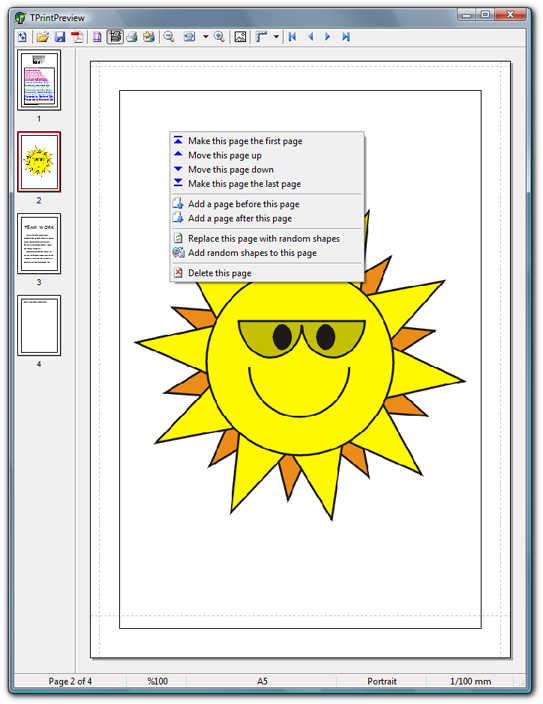
TPrintPreview is a descendent of TScrollBox and has properties of both TScrollBox and TPrinter classes. Key features of TPrintPreview are:
- Supports almost unlimited amount of pages
- Automatically adjusts printer’s paper size and orientation at the print time
- Automatically adjusts mapping modes
- Preview pages can be scaled with an arbitrarily zoom factor
- Shows created pages while new pages are being processed
- Displayed pages can be scrolled by mouse dragging
- Pages can be saved/restored to/from disk
- Each page is accessible as a Windows Metafile image
- Has some methods for rendering rich text format
- Can manage custom forms (custom paper sizes)
- Allows background and annotation for both print and preview pages
- Both preview and print pages can be displayed in grayscale, with ability to adjust brightness and contrast
- Allows inserting, replacing, editing, deleting, and reordering of pages freely at any time
- By using dsPDF library or Synopse PDF library, can save pages as PDF
- Can save pages as multi-page TIFF image
- Has a complete set of events
TThumbnailPreview
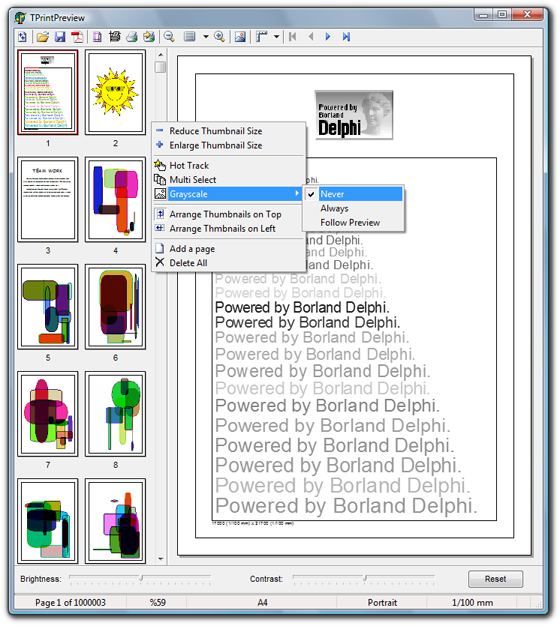
The TThumbnailPreview control is a special ListView for showing thumbnails of pages generated by TPrintPreview control.
Not only you can use this control to show thumbnail of pages, but also the users can get benefit of it to do some actions (e.g. delete, print, move, …) on the selected pages.
TPaperPreview
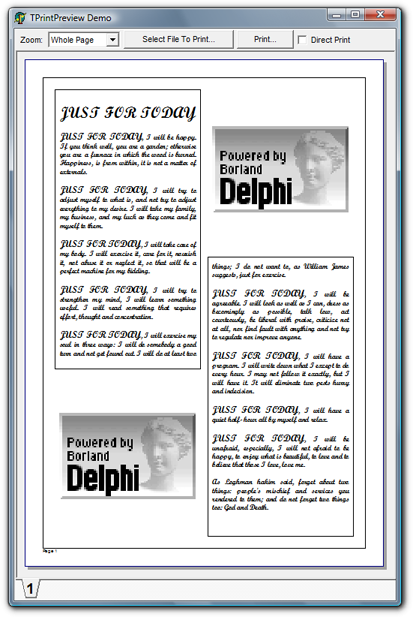
The TPaperPreview control represents a sheet of paper in the TPrintPreview control, but you can use it as standalone too.
Usage of the TPaperPreview control is very similar to TPainBox control of Delphi. However, in opposite of TPainBox, the TPaperPreview control caches the last paint and do not generate redundant OnPaint events. It also paints only invalidate part of the control not the entire client area. Because of that, this control is much more efficient than TPaintBox control.
The TPaperPreview control also can be captioned. In this case the caption appears under the page.
Download
Print Preview Components (550.0 KiB, Last updated on March 4, 2018)Source code of the print preview components, including the documentation and three sample programs.
Frequently Asked Questions
- I cannot preview an A2 paper
If Units property is set to mmHiMetric and width or height of the paper size is bigger than 32767 units, the page is displayed incorrectly. This is because the SetWindowExtEx API expects a 2-byte signed integer (Smallint) as X and Y parameters, therefore values bigger than 32767 are interpreted as negative values. To avoid this problem, use a less accrued unit. - Characters appear overlapped when I change zoom
When zoom is other than 100%, characters in non-scalable fonts appear overlapped. To avoid this problem, always use TrueType or OpenType fonts. - I have an RTF file with some embedded images, but images do not appear in preview and print
For rendering RTF, the component sends EM_FORMATRANGE message to the rich edit control. Some rich edit controls do not handle this message as expected. For example, the message handler of Delphi’s TRichEdit ignores all the embedded objects, including images. Instead of TRichEdit, you can use a third-party rich edit control. - Preview of some RTF files do not look as their print
This issue is a known rich edit control problem. - I am using TRxRichEdit control of RxLibrary, but I cannot print its content
There are some third party rich edit controls that are not derived from TCustomRichEdit class. In other hand, PaintRichText and GetRichTextRect methods of the TPrintPreview component expect a TCustomRichEdit as their RichEdit parameter. To workaround this problem and pass such kind of controls to PaintRichText or GetRichTextRect methods, safely type cast the control to TCustomRichEdit. The TPrintPreview component needs only Handle property of rich edit controls to send Windows messages to them.
Operational In
Delphinus
Delphinus is a freeware 16-bit image processing software with many powerful filtering algorithms. It also allows you to control your camera exposure time through RS-232 (serial) and LPT (parallel) ports.
Futuris Imager
This is a small and fast image viewer for Windows written by Alexander Tereschenko. It supports more then 30 graphic formats, TWAIN-compatible scanners/cameras, screen/window capture, wallpaper tools, HEX viewer, image transformations, file browser/manager, advanced printing features with preview, optional integration with Filters Unlimited and much more…
MPEG Audio Collection
This is a cute, fast, easy to use, and freeware audio file collector/player written by Jurgen Faul.
IBUtils
A freeware Interbase/Firebird Database Utilities by Ales Kahanek. IBUtils is designed to simplify the database design. The main purpose of this application is to visualize tables relationship in a database.
Just Right Click Greeting Card
A simple, small, and free application by Just Right Click Company for digital camera users to print out greeting cards of their photographs.
Chinese Practice
Chinese Practice is a freeware program with a nice user interface. Chinese Practice will not teach you Chinese, its purpose is to accompany your study at a school.
True BoxShot
True BoxShot is an easy tool to create quality box shot of your software box cover. The first thing that you potential customers encounter when they meet your product is the boxshot. For many, this is the moment they decide to take a closer look at your product or search for another. Take full advantage of this first impression by presenting a professional boxshot!
GraphicsMagic
GraphicsMagic is an open source image processing software. You do not need to install it on your computer. Also, it does not modify the system’s registry. You only need to decompress the program’s zip file into any folder on your computer, and launch the program.
Picto Selector
Select from 19000+ pictos and combine them into picto sheets. Fast search options and categories to select from. Create your own pictos from photos and text. Use drag and drop to combine picto in sheets that visualizes daily tasks. Available in Dutch, French, English, Spanish, Catalan, German and Italian.
Klibe Asset Management
Klibe is a Windows-based asset management software application (XP, Vista, Windows 7), written in Delphi, and which uses the platform-independent SQLite3 serverless database engine. Klibe can be used to make an inventory of any type of asset, is fully-customisable, can record purchases in any currency, can import and export data using in-built tools or alternatively standard SQL language commands, and is ideal for retrieving documents and/photos related to any of the assets. With special coding of entries, Klibe can also be used to create a catalogue of items. Optionally, using any one of three flag fields for each asset entry, and either further inbuilt tools or a basic knowledge of SQL, a user can adjust values for inflation or forex changes, and make other bulk changes. The application contains many pre-designed reports, and the dspdf add-in can be optionally installed to create PDF report files with a minimum of fuss. Klibe is free, but forum registration using a valid email address is required to download the setup file.
Virtual Age
If photography is your passion, Virtual Age is the program for you! Process contemporary photographs by adding them to the spirit of bygone eras! Create images that look just like those made before 50, 100, 200 years ago, only in a few clicks!
You can perform a stylization of contemporary photography, so that they look like photographs taken by traditional methods used since the beginnings of photography, that is, from the first half of the nineteenth century, as well as analog photography methods used since the mid-twentieth century.
Virtual Age is a professional application that includes a set of tools to help you to create the effect of traditional photography. Adjust color saturation, contrast and exposure of the frame, change the hue and color or completely remove the color, lower the quality of the photos by adding noise, creases, scratches, stains, and much more.
If you have a software using the TPrintPreview component, and you would like your product to be listed here, please post the link to your software’s homepage and a brief description about it on the miscellaneous section of the forum.